Introduction
In last week’s post, we talked about buying a domain on Cloudflare. This time, I want to walk through what actually happens after you type a domain into your browser — how does it eventually reach the server you set up? Let’s dig in.
Using this blog as an example: https://blog.clarkliu.com. Before the browser connects to the actual server, it goes through the following steps.
Step 1 — Check the Browser Cache
If you’ve visited the site before, your browser or OS will have cached the result. Next time you visit, it can skip the lookup entirely and go straight to the server.
Step 2 — Ask a Recursive Resolver (ISP or 8.8.8.8)
If there’s no cache hit, the browser hands the job off to a Recursive Resolver. Its role is to do the legwork for you — querying various servers until it comes back with the IP address you need. By default, your Recursive Resolver is provided by your ISP (e.g., Chunghwa Telecom in Taiwan), though you can also use a public one like Google’s 8.8.8.8 or Cloudflare’s 1.1.1.1.
Step 3 — Recursive Resolver Asks the Root Name Server
The Recursive Resolver starts at the top: it queries a Root Name Server. There are only 13 sets of Root Name Servers in the world, and their job is to point the resolver toward the right Top-Level Domain (TLD) Name Server.
TLD Name Servers are responsible for a specific top-level domain — .com, .org, .tw, .jp, and so on.
Step 4 — Recursive Resolver Asks the TLD Name Server
Now the resolver knows which TLD Name Server to ask. The TLD Name Server responds with the IP of the Authoritative Name Server for the specific domain.
The Authoritative Name Server is managed by whoever handles the DNS for your domain. If you use AWS Route 53, that’s your Authoritative NS. If you use Cloudflare, it’s Cloudflare’s DNS servers.
Step 5 — Recursive Resolver Asks the Authoritative Name Server
The Authoritative Name Server holds the actual DNS records for your domain. For example, if your domain is managed by Cloudflare, Cloudflare’s Authoritative NS will return the final IP address of your server.
Step 6 — Result Is Returned to the Browser and Cached
The Recursive Resolver passes the IP back to the browser, which then makes a direct connection to the server. The result is also cached so future lookups are faster.
Here’s a diagram to visualize the full flow:
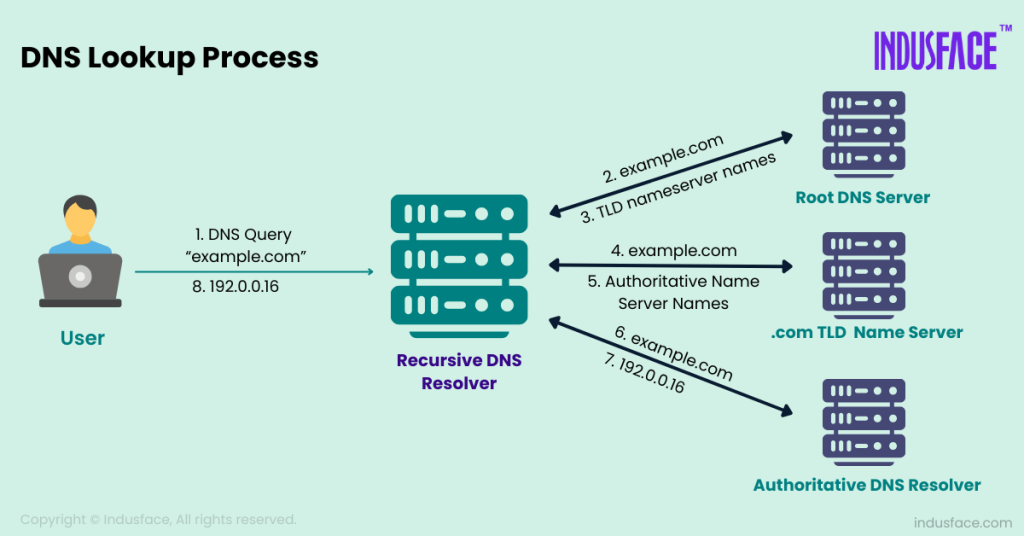
The example above assumes you bought your domain on Cloudflare and are also using Cloudflare for DNS management — the simplest case.
In practice, things can get more layered. For instance, if you bought your domain through Cloudflare but manage DNS via AWS Route 53, the lookup would go through Cloudflare’s NS first, then continue to Route 53. That’s where the DNS record types below become important.
DNS Record Types
DNS supports multiple record types. Here’s a quick overview:
| Record Type | Purpose | Example | Notes |
|---|---|---|---|
| A | Domain → IPv4 | yoursite.com -> 104.21.1.1 | Most common |
| AAAA | Domain → IPv6 | yoursite.com -> 2606:4700::... | IPv6 version of A Record |
| CNAME | Alias → another domain | www -> yoursite.com | Cannot point directly to an IP |
| MX | Mail server | yoursite.com -> mail.google.com | Used for receiving email |
| TXT | Plain text info | SPF / DKIM / domain verification | Used by many SaaS tools |
| NS | Specifies DNS authority | ns1.cloudflare.com | Tells the world “ask here” |
| SOA | DNS zone management info | serial, refresh, etc. | Key for DNS sync |
| SRV | Service location info | _sip._tcp.example.com | Common in SIP, Minecraft, K8s |
The two most relevant to this article are A and NS records. The A Record determines the final IP; the NS Record determines who the Authoritative Name Server is.
Caching and TTL
As you can imagine, doing this full resolution chain on every single request would be painfully slow. That’s where TTL (Time To Live) comes in. Every DNS record has a TTL value (in seconds) that tells resolvers how long to cache the result before re-querying.
DNS uses multiple cache layers to reduce the number of full lookups:
- Recursive Resolver cache — the most impactful; won’t re-query the Authoritative NS until TTL expires
- OS cache — cleared when TTL expires or the machine restarts
- Browser cache — cleared when TTL expires or the browser closes
Wrapping Up
DNS is deceptively complex under the hood, but I hope this walkthrough made it feel a bit more approachable. That’s all for this week — see you next time!